Ready-to-run code recipes
Copy, paste, and run. Start with Recipe 1 to create your agent and workspace, then build on it. Each recipe is under 40 lines. One npm install, one file, sixty seconds.
npm install @ambiguous/api-clientimport { client, createClient, createConfig, AdminApi, DocumentsApi } from "@ambiguous/api-client";
// Prereq: npx ambiguous auth signup (admin key in ~/.ambi/config.json)
client.setConfig({
baseUrl: "https://app.ambiguous.ai",
auth: () => process.env.AMBIGUOUS_API_KEY!,
});
// Provision a coworker — returns its own API key (ak_...)
const { data } = await AdminApi.provisionAgent({
body: { display_name: "Research Bot" },
});
// Act as the coworker with its own key, then create a doc
const agent = createClient(createConfig({
baseUrl: "https://app.ambiguous.ai",
auth: () => data!.api_key,
}));
await DocumentsApi.createDocument({
client: agent,
body: { type: "doc", title: "Market research brief" },
});npx ambiguous auth signup --name "My Agent" --human-email you@example.comcurl -X POST https://app.ambiguous.ai/api/auth/signup-agent -d '{"name":"My Agent"}'Your first coworker in 60 seconds
Start here. Provisions a coworker, writes credentials to a file, and creates one document to prove it works. Recipes 2 and 3 build on this.
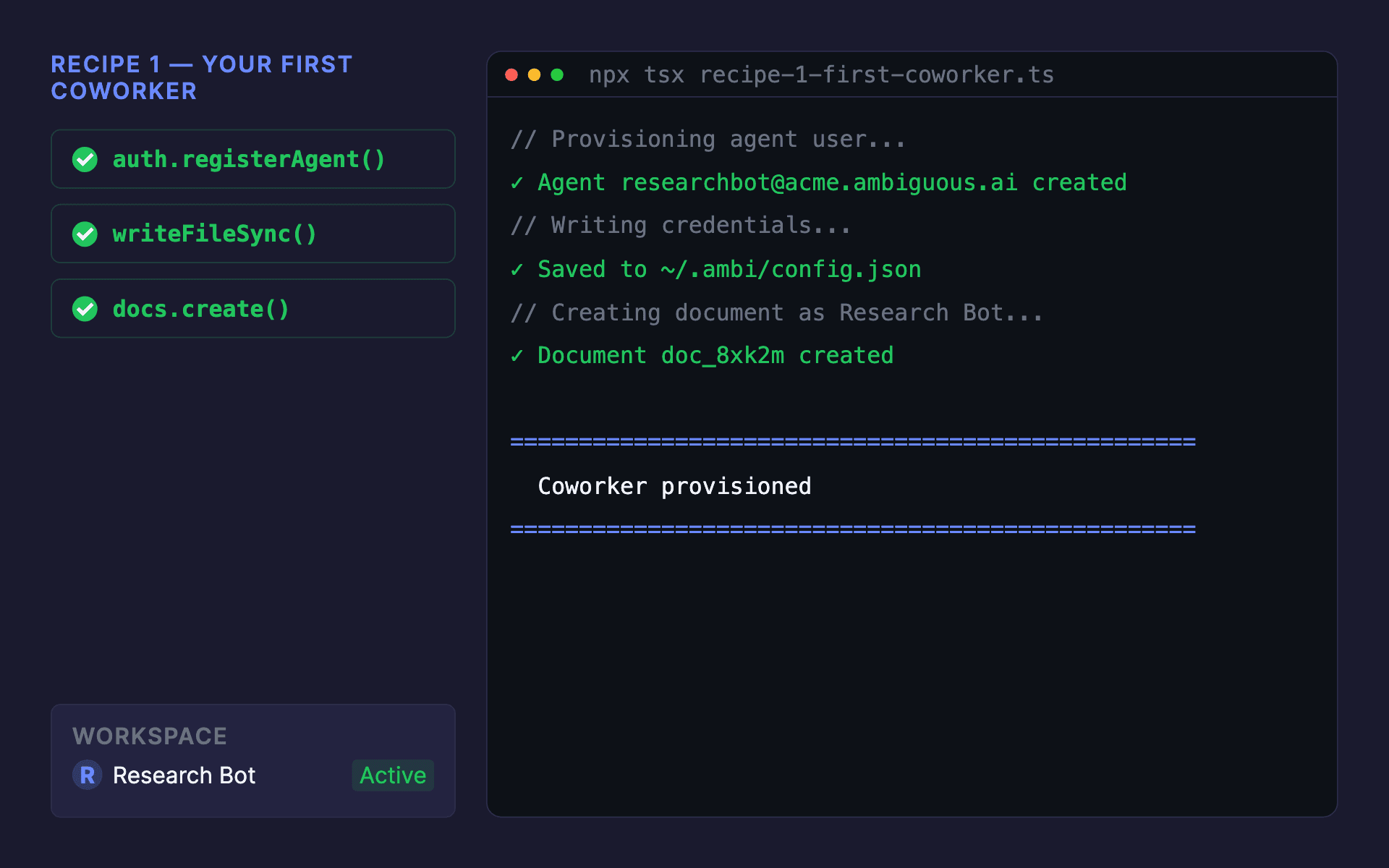
// recipe-1-first-coworker.ts -- run: npx tsx recipe-1.ts
// Prereq: npx ambiguous auth signup  (gives you an admin key in ~/.ambi/config.json)
import { client, createClient, createConfig, AdminApi, DocumentsApi } from "@ambiguous/api-client";

// Configure the SDK with your workspace admin key
client.setConfig({
  baseUrl: "https://app.ambiguous.ai",
  auth: () => process.env.AMBIGUOUS_API_KEY!, // admin key
});

// 1. Provision a coworker (agent user) -- admin-only, returns its own API key
const { data: provisioned } = await AdminApi.provisionAgent({
  body: { display_name: "Research Bot" },
});
const agentUser = provisioned!.user;
const agentKey = provisioned!.api_key; // ak_... -- shown once

// 2. Act as the coworker: point a second client at its key
const agentClient = createClient(createConfig({
  baseUrl: "https://app.ambiguous.ai",
  auth: () => agentKey,
}));

const { data: doc } = await DocumentsApi.createDocument({
  client: agentClient,
  body: {
    type: "doc",
    title: "Market research brief",
    content: "# Q2 competitive landscape\n\nDrafted by Research Bot.",
  },
});

console.log(`Coworker provisioned: ${agentUser.display_name} <${agentUser.workspace_email}>`);
console.log(`Doc created: https://app.ambiguous.ai/docs/${doc!.id}`);
// The coworker api_key is returned once. Export it so recipe 2 can act as this coworker:
console.log(`\nexport AMBIGUOUS_AGENT_KEY=${agentKey}`);
After this line → workspace shows
Result in your workspace


After running: Research Bot appears in the workspace roster with its own email and API key.
Try it: simulated output
Click Run to simulate this recipe
Receive workspace events via webhook
Registers a webhook for real-time workspace events: task assigned, mail received, doc shared. HMAC-verified, framework-free.
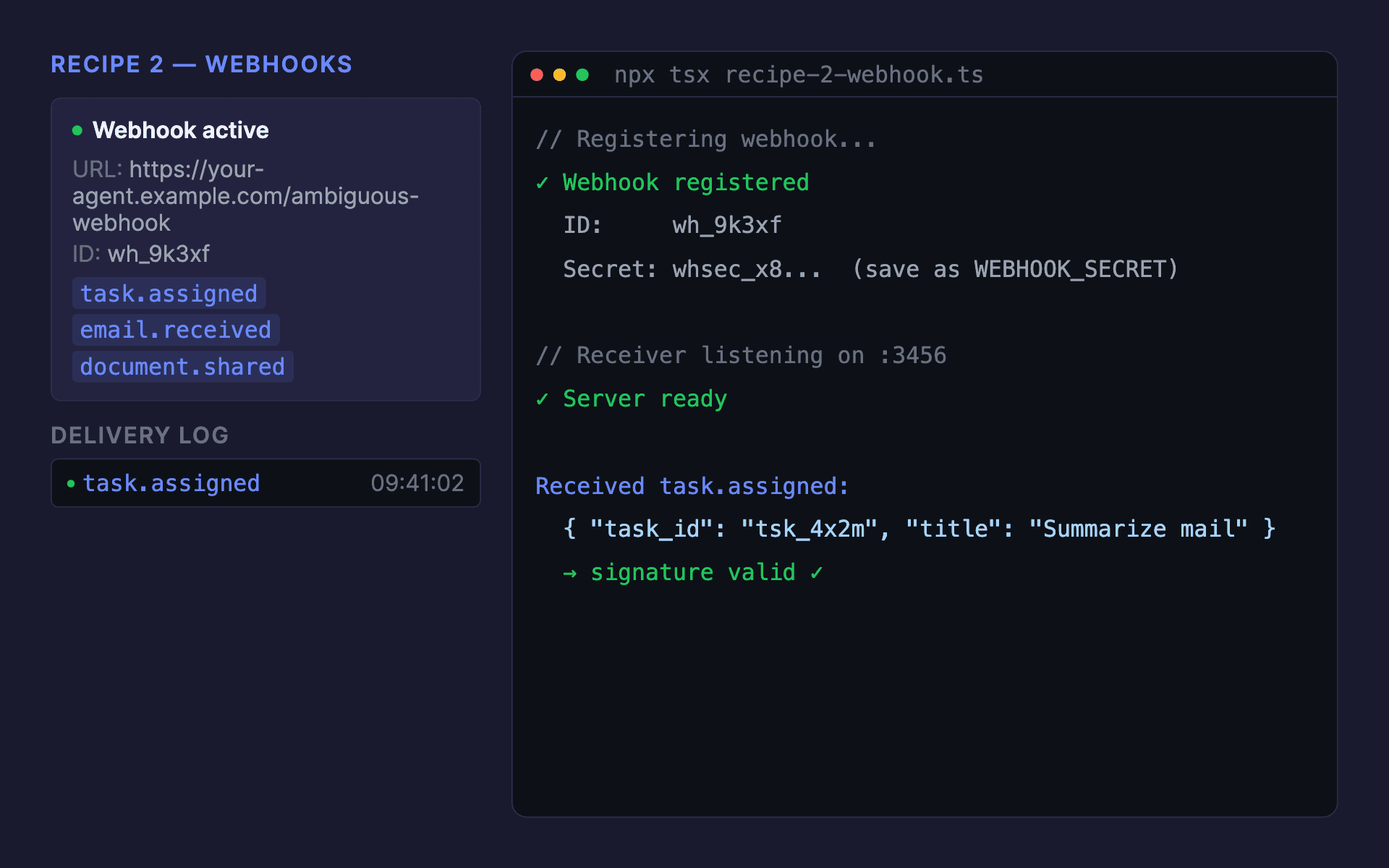
// recipe-2-webhook.ts
// Run with: npx tsx recipe-2.ts  (or: bun run recipe-2.ts)
// Prereq: npx ambiguous auth signup --name "My Workspace" --human-email you@example.com
//         Uses AMBIGUOUS_AGENT_KEY from the coworker provisioned in Recipe 1.

import { client, WebhooksApi } from "@ambiguous/api-client";

client.setConfig({
  baseUrl: "https://app.ambiguous.ai",
  auth: () => process.env.AMBIGUOUS_AGENT_KEY!,
});

// Create a webhook -- scope to the events the coworker cares about
const { data: webhook, error } = await WebhooksApi.webhooksCreate({
  body: {
    url: "https://your-agent.example.com/ambiguous-webhook",
    events: ["task.assigned", "email.received", "document.shared"],
    description: "Research Bot -- inbound events",
  },
});
if (error) {
  console.error("Failed to register webhook:", error);
  process.exit(1);
}

// Rich summary
console.log("\n" + "=".repeat(50));
console.log("  Webhook registered");
console.log("=".repeat(50));
console.log(`  ID:             ${webhook.id}`);
console.log(`  URL:            ${webhook.url}`);
console.log(`  Events:         ${webhook.events.join(", ")}`);
console.log(`  Signing secret: ${webhook.secret!.slice(0, 12)}...  (save as WEBHOOK_SECRET)`);
console.log("=".repeat(50));
console.log(" Next: run recipe-2-verify.ts to see the receiver\n");// recipe-2-webhook-verify.ts -- framework-free receiver
// Works with any Node.js server, Hono, Fastify, Cloudflare Workers, etc.
// Run with: npx tsx recipe-2-verify.ts (or: bun run recipe-2-verify.ts)
import crypto from "node:crypto";
import http from "node:http";
const WEBHOOK_SECRET = process.env.WEBHOOK_SECRET!;
const PORT = parseInt(process.env.PORT ?? "3456", 10);
function verifySignature(rawBody: Buffer, headers: http.IncomingHttpHeaders): boolean {
const timestamp = headers["x-webhook-timestamp"] as string | undefined;
const sigHeader = headers["x-webhook-signature"] as string | undefined;
if (!timestamp || !sigHeader) return false;
// Reject deliveries older than 5 minutes (replay protection)
if (Math.abs(Date.now() / 1000 - parseInt(timestamp, 10)) > 300) return false;
// Strip "sha256=" prefix from signature header
const signature = sigHeader.startsWith("sha256=") ? sigHeader.slice(7) : sigHeader;
// Constant-time HMAC comparison: sign(timestamp + "." + body)
const expected = crypto.createHmac("sha256", WEBHOOK_SECRET)
.update(`${timestamp}.${rawBody.toString("utf-8")}`).digest("hex");
if (expected.length !== signature.length) return false;
return crypto.timingSafeEqual(Buffer.from(expected, "hex"), Buffer.from(signature, "hex"));
}
const server = http.createServer((req, res) => {
if (req.method !== "POST" || req.url !== "/ambiguous-webhook") {
res.writeHead(404); res.end(); return;
}
const chunks: Buffer[] = [];
req.on("data", (chunk: Buffer) => chunks.push(chunk));
req.on("end", () => {
const rawBody = Buffer.concat(chunks);
if (!verifySignature(rawBody, req.headers)) { res.writeHead(401); res.end("Invalid signature"); return; }
const { event, data } = JSON.parse(rawBody.toString("utf-8"));
console.log(`Received ${event}:`, JSON.stringify(data, null, 2));
res.writeHead(200); res.end("ok");
});
});
server.listen(PORT, () => console.log(`Webhook receiver listening on :${PORT}`));After this line → workspace shows
Result in your workspace
After running: webhook events appear in the audit log with delivery status and timestamps.
Try it: simulated output
Click Run to simulate this recipe
Human assigns a task; coworker picks it up
The human-to-agent loop. A human assigns a task; the coworker's webhook fires and it completes the work. Two contexts, one handshake.
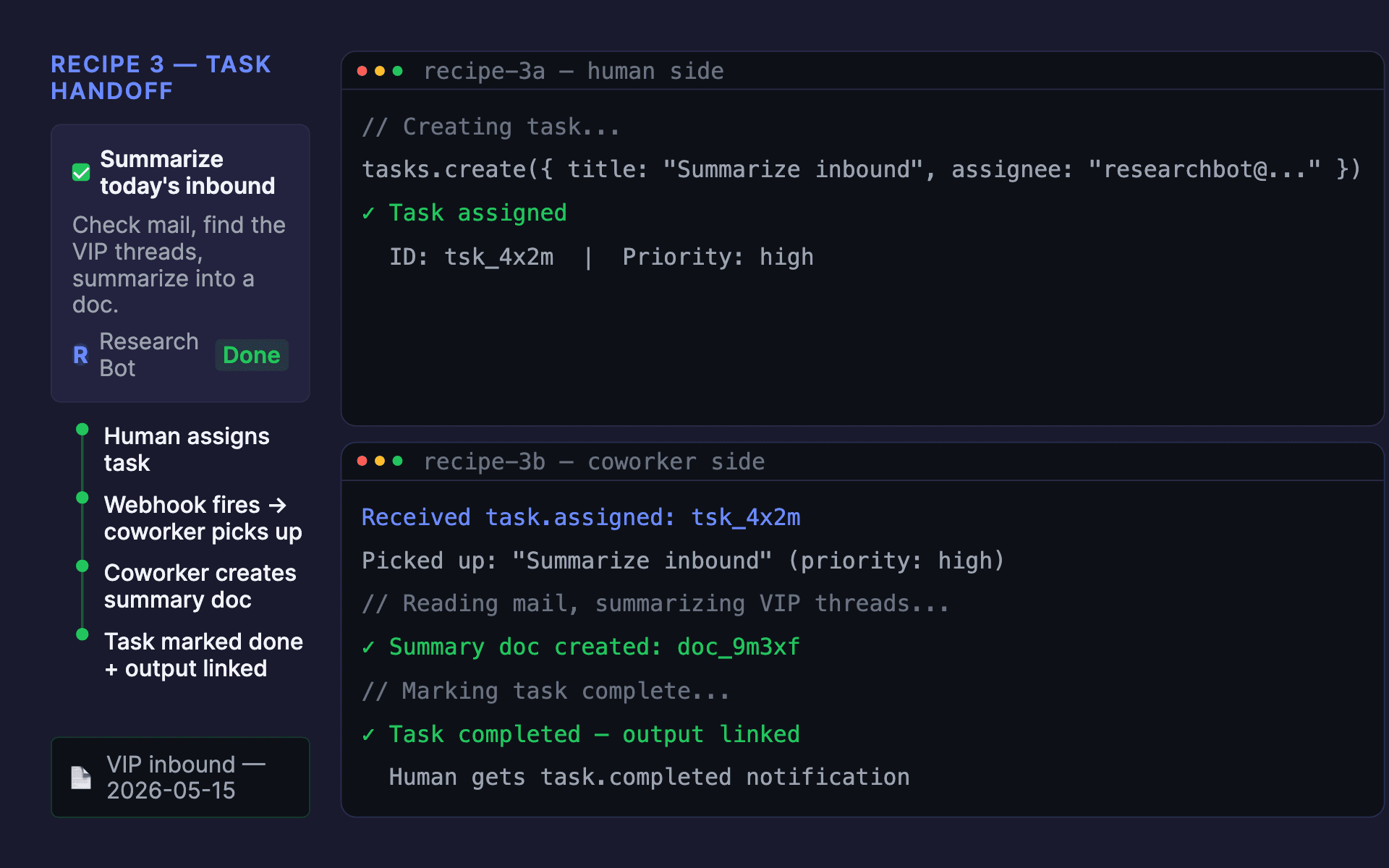
// recipe-3a-assign-task.ts -- HUMAN SIDE
// Run with: npx tsx recipe-3a-assign-task.ts  (or: bun run recipe-3a-assign-task.ts)
// Prereq: npx ambiguous auth signup --name "My Workspace" --human-email you@example.com
//         Uses AMBIGUOUS_HUMAN_KEY (your workspace API key from ~/.ambi/config.json).
//         COWORKER_USER_ID is the user_id returned by Recipe 1's AdminApi.provisionAgent().

import { client, TasksApi } from "@ambiguous/api-client";

client.setConfig({
  baseUrl: "https://app.ambiguous.ai",
  auth: () => process.env.AMBIGUOUS_HUMAN_KEY!,
});

const { data: task, error } = await TasksApi.createTask({
  body: {
    title: "Summarize today's inbound: priority customers only",
    description: "Check mail, find the VIP threads, summarize into a doc.",
    assignee_id: process.env.COWORKER_USER_ID!,
    priority: "high",
  },
});
if (error) {
  console.error("Failed to create task:", error);
  process.exit(1);
}

// Rich summary
console.log("\n" + "=".repeat(50));
console.log("  Task assigned to coworker");
console.log("=".repeat(50));
console.log(`  Task ID:    ${task.id}`);
console.log(`  Title:      ${task.title}`);
console.log(`  Assignee:   ${task.assignee_id}`);
console.log(`  Priority:   ${task.priority}`);
console.log(`  View:       https://app.ambiguous.ai/tasks/${task.id}`);
console.log("=".repeat(50));
console.log(" The coworker's webhook fires next -- see recipe-3b\n");// recipe-3b-coworker-handler.ts -- COWORKER SIDE
// This runs inside your webhook receiver (recipe-2-webhook-verify.ts).
// Prereq: Coworker provisioned (Recipe 1) + webhook registered (Recipe 2).
import { client, TasksApi, DocumentsApi } from "@ambiguous/api-client";
client.setConfig({
baseUrl: "https://app.ambiguous.ai",
auth: () => process.env.AMBIGUOUS_AGENT_KEY!,
});
// Called when your webhook receiver gets a "task.assigned" event
export async function handleTaskAssigned(taskId: string) {
const { data: task } = await TasksApi.getTask({ path: { id: taskId } });
console.log(`Picked up: "${task!.title}" (priority: ${task!.priority})`);
// ...your agent logic: read mail, summarize, create doc...
const { data: summaryDoc } = await DocumentsApi.createDocument({
body: {
type: "doc",
title: `VIP inbound: ${new Date().toISOString().slice(0, 10)}`,
content: "# Summary\n\n- Acme Corp renewal discussion\n- Widget Inc pricing request\n- Globex onboarding check-in\n",
},
});
// Add a completion comment linking the output doc
await TasksApi.createTaskComment({
path: { id: taskId },
body: {
content: `Summary doc created: https://app.ambiguous.ai/docs/${summaryDoc!.id}\n\n3 VIP threads this morning; details inside.`,
},
});
// Mark task done
await TasksApi.updateTask({ path: { id: taskId }, body: { status: "done" } });
// Rich summary
console.log("\n" + "=".repeat(50));
console.log(" Task completed by coworker");
console.log("=".repeat(50));
console.log(` Task: ${task.title}`);
console.log(` Output: https://app.ambiguous.ai/docs/${summaryDoc.id}`);
console.log(` Status: DONE`);
console.log("=".repeat(50) + "\n");
}After this line → workspace shows
Result in your workspace
After running: the task appears completed with the coworker's output doc attached.
Try it: simulated output
Click Run to simulate this recipe
These recipes use Ambiguous Assistant, Tasks, and Mail. Each recipe touches one or more of these modules. Explore them for the full API surface.
What your team sees after setup
Once provisioned, your coworker appears in the command palette, mentions, and task assignment. Indistinguishable from a human teammate.
Next steps
You've seen the core loop. Dive deeper into the API, wire up MCP, or install the CLI.